AIPickr
Short answer: Claude Pro is the best AI writing tool for most bloggers. Pair it with Grammarly for the final edit. Add Surfer only when you have enough posts to optimize.
Most bloggers don’t need five subscriptions. They need one tool that drafts well, one that catches mistakes, and later, one that shows what to fix for search.
Our picks at a glance
- Claude Pro — best for drafting long posts from your own notes.
- ChatGPT Plus — best if you also want featured images from the same app.
- Grammarly Pro — best final edit pass, right inside your editor.
- Surfer — best when you’re ready to optimize posts for Google and AI search.
- Jasper Pro — best for teams managing several brand voices.
| Feature | Claude ProRecommended | ChatGPT Plus | Grammarly Pro | Surfer | Jasper Pro |
|---|---|---|---|---|---|
| Starting paid price | $17–20/mo | $20/mo | $12/mo (yearly) | $49/mo (yearly) | $59–69/mo |
| Free plan or trial | Free plan | Free plan | Free plan | 7-day trial | |
| Writes first drafts | |||||
| Grammar & tone editing | |||||
| SEO content score | Not listed | ||||
| Plagiarism check | Higher plans | Copyscape add-on | |||
| Brand voice / style guide | Projects | Custom GPTs | |||
| Image generation |
What bloggers actually need from AI
A blog post has four jobs: plan, draft, edit and optimize. No single tool does all four well, so match tools to jobs.
General assistants like Claude and ChatGPT are strongest at planning and drafting. Editors like Grammarly shine at the last 10%. SEO tools like Surfer tell you what competing pages cover that yours doesn’t.
If you want the full workflow, our step-by-step guide to writing a blog post with AI walks through each stage with prompts.
Best for drafting: Claude Pro
Claude earns the top spot because of how it handles long, source-heavy work. A Project can hold your style guide, three of your best posts and your research notes, and every chat inside it uses them.
That matters for bloggers because voice consistency is the hardest thing to keep with AI. You set the rules once instead of pasting them into every chat.
At $17 a month on yearly billing, it’s also the cheapest serious drafting tool here. Last checked: 2026-11.
Best all-in-one: ChatGPT Plus
ChatGPT is the pick if you want one bill for writing and visuals. Plus includes image creation, so you can make a featured image or a simple diagram without opening another app.
Custom GPTs let you save a “blog assistant” with your instructions baked in. It’s the closest thing to Claude’s Projects, and you can share it with a co-writer.
The catch: Plus is $20 a month with no annual discount. Our ChatGPT vs Claude vs Gemini comparison covers the differences in more depth.
Best for editing: Grammarly Pro
Grammarly doesn’t replace a drafting tool. It’s the last pass that catches what you and the AI both missed.
Pro adds tone adjustments, full-sentence rewrites, citation consistency, and plagiarism and AI-text detection. It also raises AI prompts from 100 a month on Free to 2,000 per member.
Grammarly Pro is $12 a month on an annual plan ($144 a year). Month to month it’s $30, so try it monthly first and switch to yearly once you know it earns its place. Last checked: 2026-11.
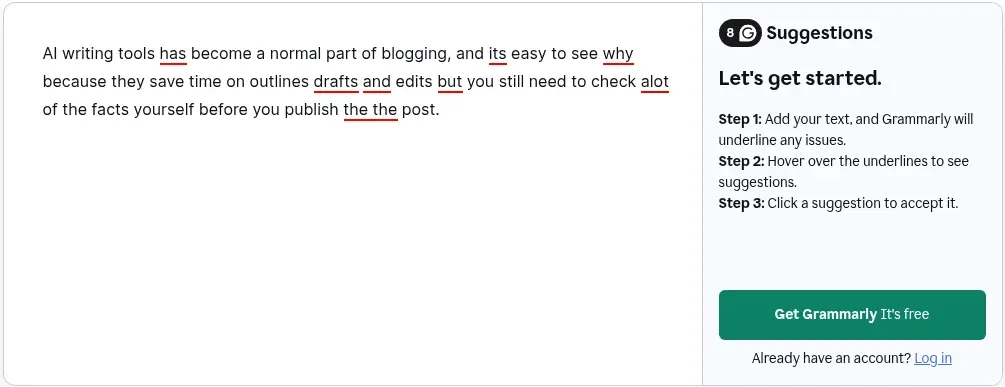
In our test, Grammarly’s free online checker underlined all five planted error types in our paragraph and counted 8 suggestions. Hovering for the fixes brought up a sign-up prompt instead, so on the signed-out page we could confirm what it flagged but not which replacements it would suggest.
Best for SEO: Surfer
Surfer is the tool to add once your blog has traction. Its Content Editor scores a draft against pages already ranking, and its tracker shows whether ChatGPT, Gemini and Google’s AI Overviews mention your site.
The Discovery plan is $49 a month billed yearly and includes 120 documents. Standard is $99 a month, also billed yearly, and adds AI visibility tracking. Last checked: 2026-11.
For a brand-new blog this is premature. Write first, then optimize the posts that already get impressions in Search Console.
Best for teams: Jasper Pro
Jasper is built for marketing teams. Its strengths are Brand Voice, style guides, visual guidelines and multi-brand management.
Pro costs $69 a month, or $59 a month billed yearly, with a 7-day free trial. For a solo blogger that’s hard to justify when Claude or ChatGPT costs a third as much.
For an agency writing for five clients, the brand controls can pay for themselves.
Recommended stacks by budget
| Budget | Stack | Monthly cost |
|---|---|---|
| $0 | Claude Free + Grammarly Free | $0 |
| About $20 | Claude Pro (yearly) + Grammarly Free | $17 |
| About $30 | Claude Pro + Grammarly Pro (both yearly) | $29 |
| Growth | Claude Pro + Grammarly Pro + Surfer Discovery (all yearly) | $78 |
Prices from official pages, last checked: 2026-11. Need featured images too? See our best AI image generators comparison.
How we picked
We compared each tool’s official plan page against the four jobs above. Feature claims come from the vendors’ official pages. Notes marked “In our test” come from running our standard prompts in ChatGPT (Free plan) and Grammarly’s free online checker. Our full method is on the How We Test page.
The tools in detail
1. Claude
Our pickPrice: Pro $20/mo, or $17/mo billed yearly ($200) · Last checked: 2026-11
Pros
- Projects keep your style guide, past posts and research together.
- Long context (up to 1M tokens depending on model) handles big source packs.
- Yearly billing brings the price to $17/mo.
Cons
- No keyword or SERP data — you bring your own research.
- Usage limits reset every 5 hours and weekly.
- No built-in plagiarism check.
- Best for
- Solo bloggers who write long posts and want to keep research, notes and style rules in one Project.
- Skip it if
- Bloggers who need built-in keyword data or a plagiarism checker.
2. ChatGPT
Price: Plus $20/mo (monthly billing only) · Last checked: 2026-11
Pros
- Image creation for featured images and diagrams in the same plan.
- Custom GPTs let you save a reusable blog-writing assistant.
- Deep research for background reading.
Cons
- No annual billing on Plus.
- No keyword data or content score.
- Model list changes often.
- Best for
- Bloggers who also want images, featured graphics and custom GPTs in the same subscription.
- Skip it if
- Writers who want an annual discount.
3. Grammarly
Price: Free; Pro $12/mo billed yearly ($144), or $30 month to month · Last checked: 2026-11
Pros
- Tone and full-sentence rewrites on Pro.
- Plagiarism and AI-text detection listed on the plan.
- Pro includes 2,000 AI prompts per member per month (Free: 100).
Cons
- It edits; it doesn't plan or research.
- The $12 price needs a yearly commitment; monthly billing is $30.
- Some features overlap with what Claude or ChatGPT already do.
- Best for
- Anyone who wants a final polish pass in the browser, WordPress editor or Google Docs.
- Skip it if
- Writers who need an AI to produce first drafts.
4. Surfer
Price: Discovery $49/mo, Standard $99/mo (both billed yearly) · Last checked: 2026-11
Pros
- Content Editor guidelines based on competing pages.
- Tracks mentions in ChatGPT, Gemini and Google AI Overviews.
- Discovery plan includes 120 documents.
Cons
- Expensive for hobby blogs.
- Pricing is built around AI-search tracking, not just writing.
- Annual billing needed for the lowest price.
- Best for
- Bloggers with traffic goals who want a content score and AI-search visibility tracking.
- Skip it if
- New blogs with under ~20 posts — spend the money on writing first.
5. Jasper
Price: Pro $69/mo monthly or $59/mo billed yearly · Last checked: 2026-11
Pros
- Brand Voice, style guide and multi-brand management.
- Image generation included on paid plans.
- 7-day free trial.
Cons
- About three times the price of Claude Pro or ChatGPT Plus.
- Built for marketing teams more than personal blogs.
- Business plan pricing is sales-only.
- Best for
- Marketing teams and agencies juggling several brand voices.
- Skip it if
- Solo bloggers on a budget.
Final verdict
Start with Claude Pro for drafting and Grammarly Free for editing. Upgrade Grammarly when you publish every week, and add Surfer when you have posts worth optimizing.
Choose ChatGPT Plus instead of Claude if you want images in the same tool. Choose Jasper only if you manage several brands.